Stretching Cutscene's DSL Capability
Quick update, The engine is reaching its completion, and this week I’m tweaking the some new commands for my custom data format for storing screenplay sequence (aka. cutscene). Along the way refactoring many parts of the Audio Systems.
DSL new Grammar and Actions
A. Brief History
The engine uses it’s specific language to construct cutscenes, composed of track and keys. I called the entire cutscene system as Play as in drama play. The reason is how practical screenplay formats is, not only for making films but also game cutscenes. I like how the screenplay uses strict keywords like FADE, EXT, CUT to describe real time theatrical movement with just textural information. Even if it’s not a strict ruled language, I can take some and make a stricter rule that translates directly to the engine.
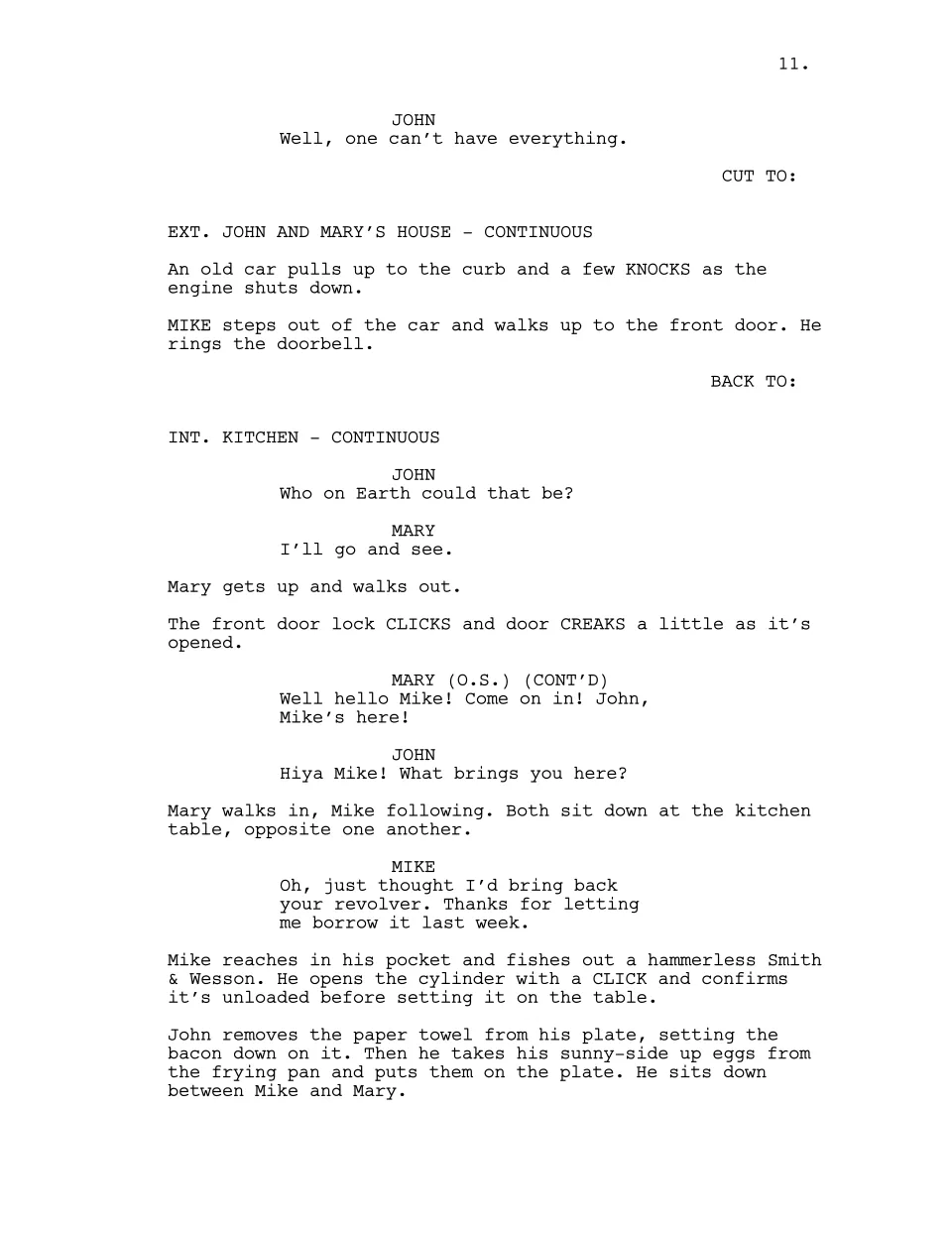
First straight to the data structure form of Play, Tracks and Keys.
struct Play {
  ...
  std::unordered_map<std::string, Track> tracks;
  ...
}

struct Key {
  float ta;
  float tb;
  float t;
  std::string command;
  ...
}
The grammar for the our script starts with header defintion explaining the description of act, duration budget and behavior link (DLL functions call to interact with game world). Then proceeded with the content within markup style enclosure.
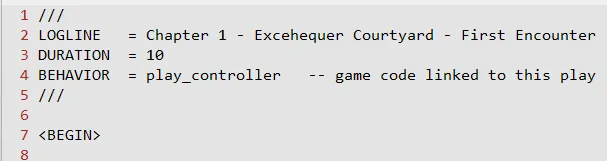
Then each action are grouped in Action blocks, these blocks consist of action definition and action command.
The syntax started with sigil (x) and (=), respectively describes parallel or blocking nature of the key. Then completed with the actor name (can be object or system reserved names) after with it’s time range for lerp.
Next, define the reserved command names. Everytime you add new blocks, the Play will collect and group it based on the actors.
The general Action block Form (Exception exist) :
<sigil> <game_actor/system_actor> [ta, tb]  -- action definition
<command> <target> <args>                   -- action command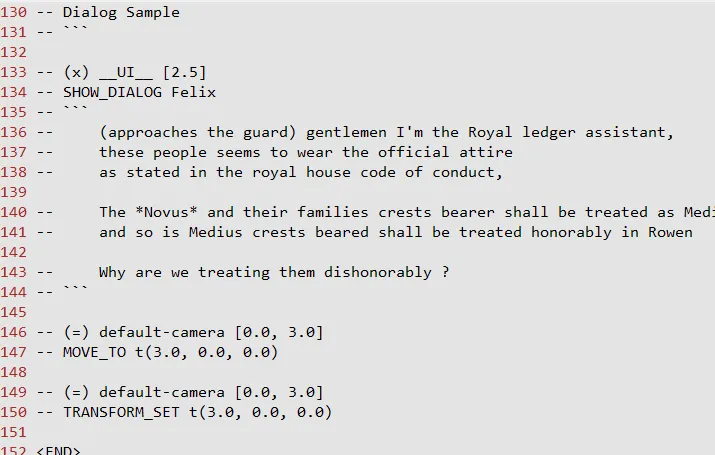
I use the tripple back tick ``` to enclose multi-line text like screen play dialogue.
B. The Commands Improvement
At first the commands I made were just TRANSFORM_SET, PLAY_BGM and PLAY_ANIM. Then expanded to all sorts of useful utility such as MOVE_TO, ROTATE_TO, LOOK_AT, CAMERA_FOLLOW, CAMERA_SET, CAMERA_FILTER, PLAY_BGM/SFX, STOP_SFX/BGM, VOL_SFX/BGM, VOL_MASTER, SHOW/HIDE.
Same Principle with the other commands with extra treatment.
Visualizing Play on Editor
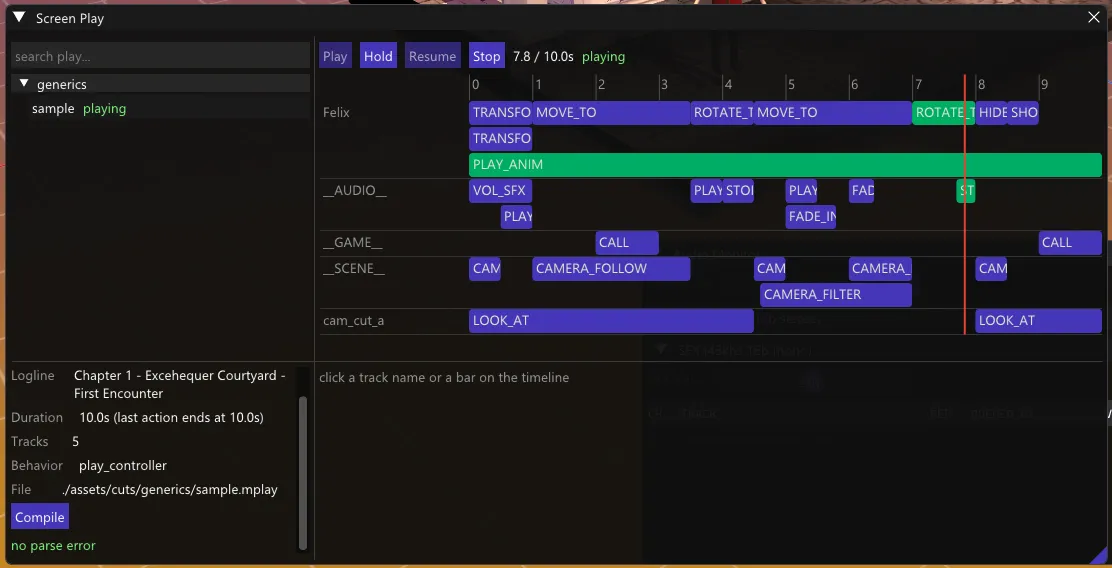
Once script gets big, debugging will surely become an iteration bottlenecks, so I decided to make one simple read-only sequence visualizer. The goal is to be able check for parsing errors, then whether the keys are shaped and positioned at the correct lane.
The UI divided into four region, top left for list asset on disk, top right for the main timeline view, the bottom part are just extra info details. It didn’t let you to move things out, because it will intervene with the play text, thus special handling needed. We’re avoding complexity of such low ROI.
Note I let AI implement this window from my basic sketches, the pattern is already all over the codebase, It’s a waste of time if I were to write this on my own. Especially the timeline part, very tricky and dense with imgui drawlist logic.
What’s Next
That’s it for this week. There are only two task left in my back log before pre production phase, Collision System and In-Game Console.
Comments